Finding Security Fixes Without CVE: A Changelog and Commit Pipeline
Many real security fixes never get a CVE. Maintainers patch a vulnerability, mention it in release notes or commit messages, and move on. If you care about supply-chain risk or tracking silent fixes, those changelogs and commits are a useful but underused signal. In this post I’ll walk through a pipeline that surfaces security-related fixes and singles out the ones without a CVE so you can triage them yourself.
Why security fixes without CVE matter
Open-source projects ship security fixes all the time. Sometimes the fix is tagged with a CVE; often it isn’t. You get entries like “fixed SQL injection in user search” or “remove sensitive data from error responses” with no CVE ID. That makes it hard to track what was actually fixed, whether your version is affected, and whether the issue ever got a formal identifier. For dependency graphs and compliance, the gap is real: you’re left with free-text release notes and commit history.
I wanted a way to run a list of GitHub repos, pull their release changelogs and commits, flag entries that look like security fixes, and then check NVD (and the changelog text) for an existing CVE. Whatever has no CVE becomes an alert. Not a pentest, not a replacement for reading code; just a triage aid so I can decide which fixes might deserve a CVE or deeper analysis.
Pipeline overview
The flow is straightforward. You feed in one or more GitHub repository URLs. For each repo, the tool fetches releases (via the GitHub API), parses the changelog for each release, and when the release body is empty it falls back to the first line of each commit between that release and the previous one. Those entries are analyzed in batch for security relevance. High-confidence hits can be verified against the actual commits and patches. Every detected security fix is then checked against the NVD API; if no relevant CVE is found, an alert is emitted.
End-to-end flow:
- Repo URL → Releases → Changelog entries (or commit messages)
- Changelog entries → Security detection (LLM + filters) → Optional commit/patch verification
- Detected security fix → CVE check (NVD + relevance logic) → Alert if no CVE
The tool does not do full penetration testing. It also filters out plain dependency bumps (e.g. “chore(deps): bump X”); the goal is to find fixes in the repository’s own code, not in transitive dependencies.
Where the data comes from: changelog and commits
Releases come from the GitHub API. For each release, the pipeline uses the release body as the changelog. Many projects paste their release notes there: bullet points, “Fixed …”, “Security: …”, and so on. If the body is empty, the tool compares the release tag to the previous one and collects the first line of each commit in that range. Those lines become a synthetic changelog. So you get either the maintainer’s summary or a commit-message view of what changed.
Both sources matter. The changelog is the high-level signal; the commits are the evidence. The pipeline uses the changelog for batch security detection, and for high-confidence candidates it can pull the related commits and even the patch content to verify that the fix is in production code (e.g. parameterized query, escaping, removal of sensitive data) and not just docs or tests.
Security detection: LLM and rules
Detection runs in two stages: batch analysis of the changelog text, then optional verification with commits and patches.
Batch analysis. The changelog (or the list of commit-message lines) is sent to an LLM with a prompt that asks for exploitable vulnerability fixes: SQL injection, XSS, RCE, SSRF, auth bypass, information disclosure, path traversal, and similar. The prompt explicitly tells the model to skip dependency updates, generic “security improvements,” TLS upgrades, and feature additions (e.g. “added 2FA”). Each reported fix gets a confidence score; only entries above a threshold (e.g. 0.9 for clearly exploitable) move on. Before calling the API, simple filters drop obvious non-security entries (e.g. “chore(deps)”, “security improvement”) and require at least some security-related keywords so we don’t waste calls on unrelated lines.
Verification with commits and patches. When the changelog says “fixed X” with high confidence, the pipeline fetches the commits for that release and, if available, the patch content. It filters out test files, docs, and config-only changes, then runs the LLM (and some heuristics) on the remaining patches. We look for patterns like parameterized queries replacing string concatenation, escaping/sanitization for XSS, or removal of sensitive data from logs. If the code matches, we keep the finding; if not, we lower confidence or drop it. That step cuts a lot of false positives where the changelog sounds like a security fix but the diff is just refactoring or tests.
CVE check and alerting
For each detected security fix, the pipeline extracts keywords and the vulnerability type, then queries the NVD API. Relevance is decided by comparing the CVE description to the fix description: overlapping technical terms, product/repo name, and so on. If the changelog explicitly mentions a CVE ID, that counts as a direct match. When no relevant CVE is found, the tool creates an alert with the release version, vulnerability type, description, confidence, reasoning, and links to the release and fix commits. Optionally it can attach affected files and a short exploitation summary.
Alerts are written to a JSON file per run (e.g. security_alerts_owner_repo_timestamp.json). You get release version, vuln type, description, confidence, fix commit SHA and URL, and affected files. There is also an option to store scans and alerts in SQLite and to use a small web UI for triage. For alerts you approve, the tool can generate CVE-style reports (AI or rule-based description) for submission or internal use. Exact commands and options are in the project README.
What you get and what to watch for
After a run you get a list of “security fix, no CVE” candidates with version, type, reasoning, and links. You can prioritize which of these might deserve a CVE request or a deeper look. If you maintain a list of dependencies, you can rescan periodically and track silent security fixes across them.
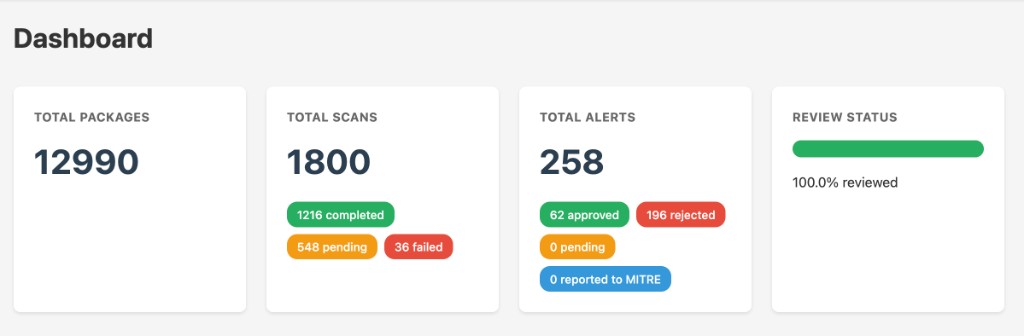
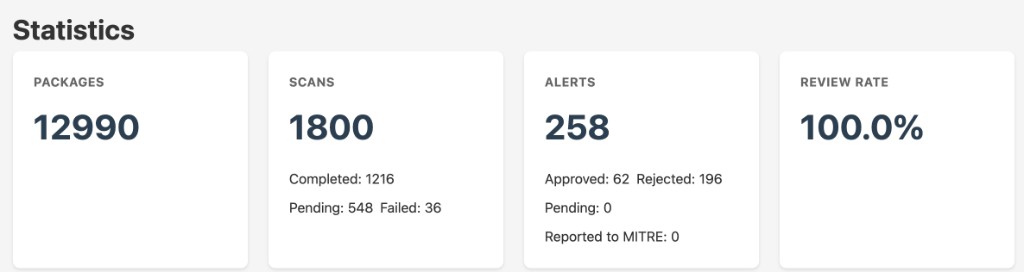
So far, across the repos I’ve run it on, the pipeline has produced 258 total alerts: 62 approved (real fix, worth triaging or reporting), 196 rejected (false positive or not CVE-worthy), 0 pending, and 0 reported to MITRE yet. That gives you an idea of the noise ratio and that manual triage is still the bottleneck after detection.
The web UI shows this at a glance. The dashboard summarizes packages (12,990), scans (1,800: 1,216 completed, 548 pending, 36 failed), and alerts with their triage status; the statistics view breaks down the same numbers in a compact form. All 258 alerts are reviewed (100% review rate).
Limitations. The LLM can still mark non-exploitable or vague entries as security fixes; verification and confidence thresholds reduce but don’t remove that. NVD is not complete or instant; some fixes may already have a CVE elsewhere or get one later. GitHub and NVD both rate-limit; for large repo lists you need a token and sane throttling. I treat the output as a triage list, not a ground-truth vulnerability database.
Takeaway
Changelogs and commit messages are a useful signal for security fixes, and many of those fixes never get a CVE. A pipeline that fetches releases, detects security-related entries with an LLM and rules, verifies with commits and patches when possible, and then checks NVD can surface and triage those candidates. You get a list of “fixed something security-relevant, no CVE” that you can then review, request CVEs for, or feed into your own tracking.
The tool is called changelog-analyzer; I haven’t published it on GitHub yet. When I do, I’ll add the link here. If you work on vulnerability disclosure or CVE triage, you might also find the approach in posts like CVE-2025-66019: LZW Decompression DoS in pypdf or Timing Attack in Meilisearch API Key Comparison useful for thinking about how fixes get identified and reported.